 RICHARD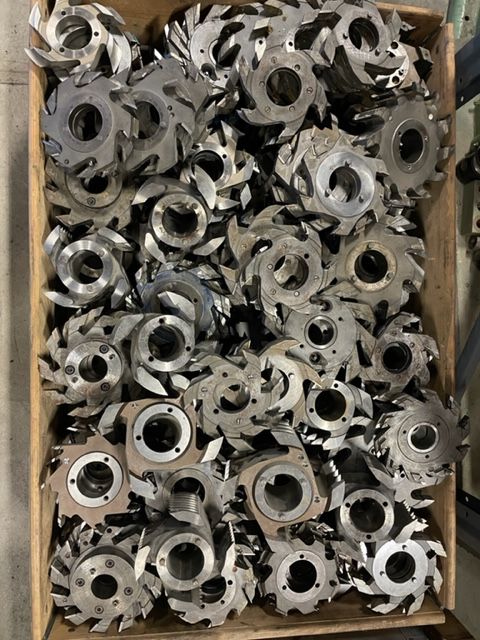
Planer Machine: Tips & Tricks from the Shop Floor
Anyone who has spent years standing behind a planer machine knows the manual is only half the story. It's on the shop floor, working with timber that isn't always as straight or dry as you'd like, that the real tricks are learned. Here we've gathered practical advice from operators and workshop managers who work daily with planer machines in the sawmill and joinery industry.
Correct feed speed for a clean finish
One of the most common mistakes we see is running too high a feed speed relative to the cutter's RPM and the quality of the timber. The result is wave patterns, chipping around knots, and uneven surfaces. A good rule of thumb is to start at the lower end of the speed range and gradually increase until you see the first signs of waviness – then back off one notch. Damp timber, hardwoods, and deep cuts always require lower feed rates than dry, soft standard timber.
Don't forget that feed speed also affects blade life. Running too fast with dull blades puts unnecessary strain on both the motor and the bearings.
Choose the right cutter steel and round cutters
The choice of steel is just as important as the machine itself. Carbide holds an edge longer but is more sensitive to impacts, while HSS steel is tougher against shocks but needs sharpening more often. On many shop floors, operators mix the two: carbide for long runs of standard timber, HSS for timber with more knots and impurities.
If you're considering replacing or expanding your tooling, it's worth reviewing the range of planer cutters, round cutters, and steel – the right cutter geometry makes a huge difference to surface finish and energy consumption. Many underestimate how much a worn or poorly chosen round cutter can drive up annual electricity costs.
Keep the infeed clean and properly adjusted
An often-overlooked step is the machine's infeed itself. A dirty or misaligned infeed causes skewed feeding, which in turn leads to uneven planing and increased load on the rollers. Regularly check that the fence rails and feed rollers at the infeed are parallel to the table.
If your current infeed is worn or can't keep up with production pace, upgrading the planer infeed / splitting infeed can be a relatively cheap measure with a big impact on the whole line's flow – especially if you run multiple shifts and want to reduce downtime for manual adjustment.
Common beginner mistakes to avoid
- Skipping the warm-up. Run the machine idle for a few minutes before production, especially in winter. Cold hydraulic oil and stiff bearings reduce precision during the first minutes.
- Wrong fence pressure. Too much pressure against the fence creates friction heat and marks in the timber; too little gives an uneven edge.
- Not listening to the machine. An unusual sound is almost always an early warning – ignore it and the repair gets more expensive down the line.
- Underperforming dust extraction. Poor extraction reduces operator visibility and increases fire risk from chip buildup around the motor and bearings.
A daily and weekly check that pays off
A simple checklist many workshops use:
Daily:
- Clear chips from the table and fence rails
- Check that dust extraction is pulling properly
- Quickly inspect blade sharpness visually
Weekly:
- Lubricate feed roller bearing points according to the manufacturer's schedule
- Measure the parallelism between infeed and outfeed
- Check belts and chains for wear
This kind of routine rarely takes more than 15–20 minutes a day but saves hours of unplanned downtime every month.
Think about the timber flow, not just the machine
Many people focus solely on the planer machine itself but forget that the flow before and after affects the result just as much. Uneven timber supply, improper storage before planing (varying moisture content), or poor unloading after the machine create problems that are mistakenly blamed on the machine. Look at the whole production line before concluding that the planer is the problem.
Invest smartly in a used planer machine
For small and medium-sized sawmills, used planer machines are often the most cost-effective choice, provided you know what to look for. Models like the WACO HM225/3000 are known for their robust construction and easy servicing, while a Weinig U 17 is often appreciated for its flexibility in smaller runs and varying profiles. Both types require the same basic maintenance philosophy: clean infeeds, the right steel, and a feed speed matched to the material.
Regardless of make, the same basic rule from the shop floor applies: a planer machine that's maintained correctly every day delivers both better surface finish and a longer service life than a machine that's simply run until it breaks.
FAQ
How often should you replace or sharpen cutter steel in a planer machine? It depends on the material and running time, but as a guideline, carbide steel should be inspected every 40–60 operating hours, while HSS steel often needs checking more frequently, every 15–25 hours under intensive production.
What is the most common cause of wave patterns on planed timber? Too high a feed speed relative to the cutter's RPM is the most common cause, followed by unbalanced or dull blades and a poorly adjusted infeed.
Is it worth upgrading the infeed separately instead of buying a whole new machine? If the base machine is in good condition, upgrading the infeed is often a cost-effective solution that improves feed precision and reduces downtime without the large investment of a completely new planer.